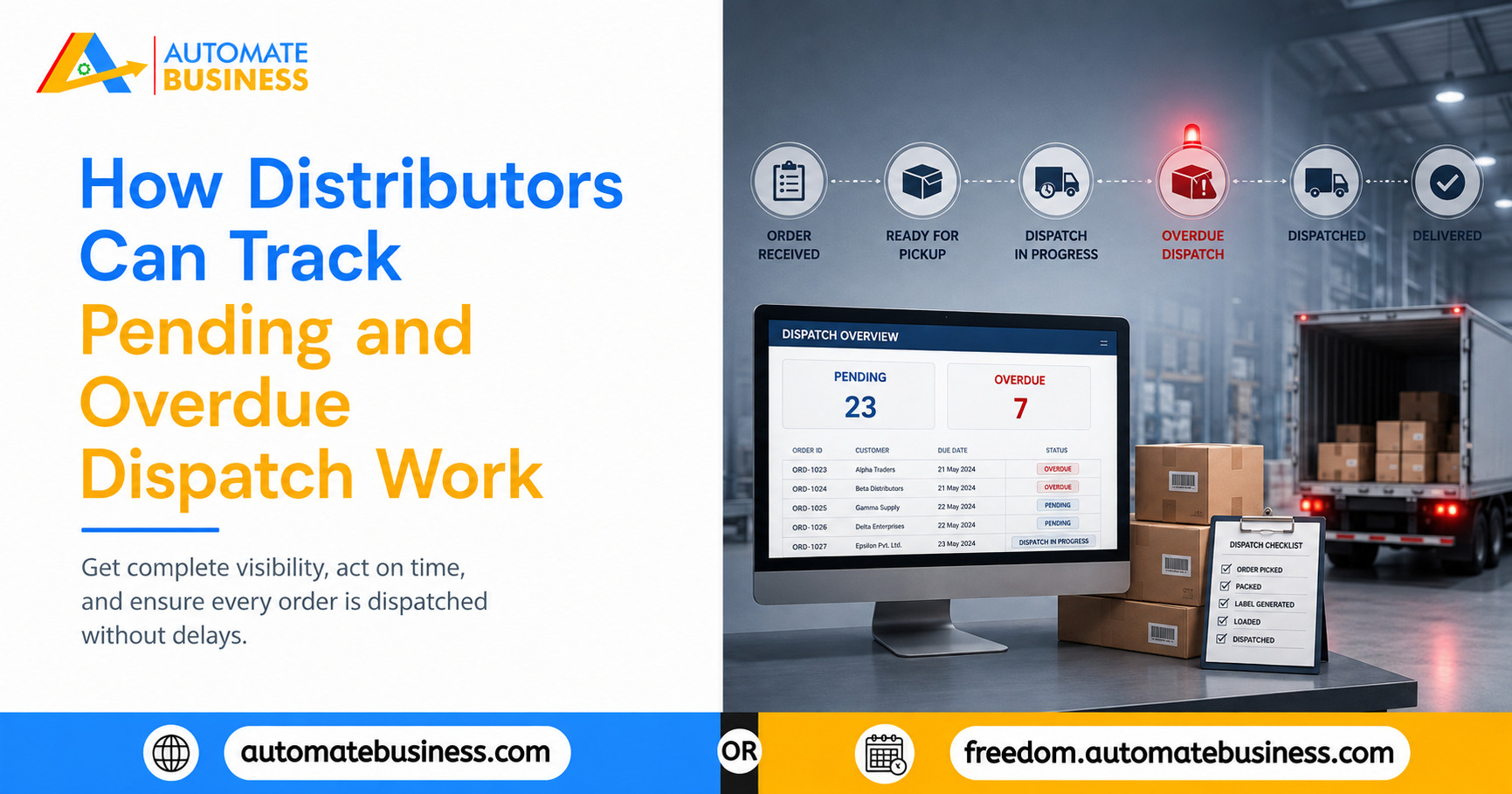
How Distributors Can Track Pending and Overdue Dispatch Work
Learn how distributors can stop dispatch delays by tracking pending and overdue work with WhatsApp reminders, dashboards, and Automate Task Management.
Join the Business AI Summit 2027

Managing a healthcare clinic is a constant exercise in coordination. Every working day, dozens of tasks flow across multiple staff members simultaneously patient intake documentation, appointment confirmations, lab sample coordination, equipment sterilization checks, billing queries, prescription follow-ups, staff attendance, and compliance logs. Each of these tasks belongs to a specific person, has a specific deadline, and matters to the patient experience in a way that most administrative work in other industries simply does not.
When a clinic runs on verbal instructions, WhatsApp groups, and handwritten checklists, the manager has no reliable way to know at any given moment whether the right work is being done by the right person. The only way to find out is to ask. And asking, repeatedly, is how clinic managers spend their days instead of improving processes and growing the practice.
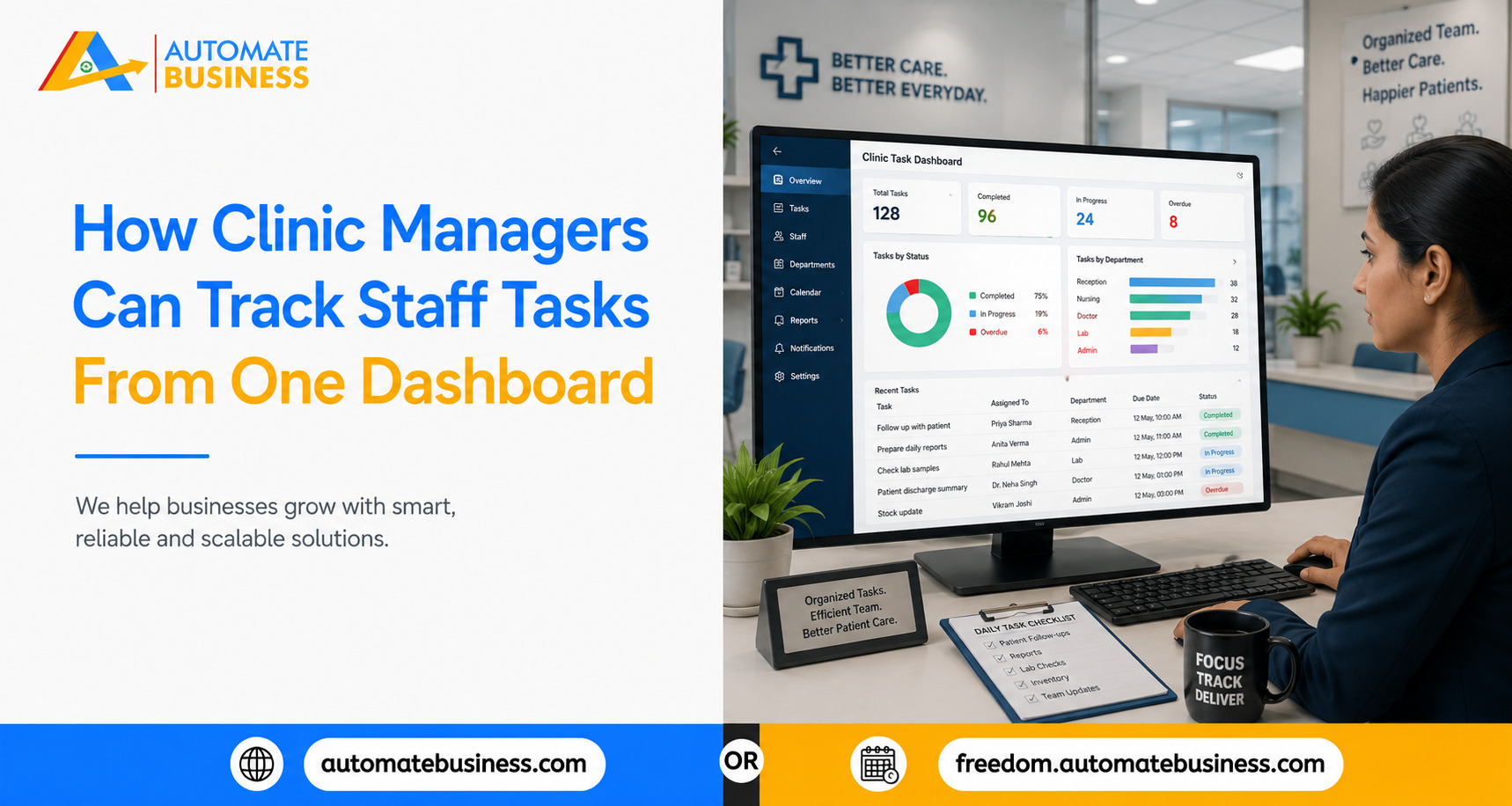
Automate Task Management by Automate Business gives clinic managers one dashboard where every staff task is visible, tracked, and accountable without a single status call. Assign tasks with deadlines and priority, send automatic WhatsApp reminders before due dates, track completion across list and Kanban views, and receive escalations when tasks are overdue on web, Android, and iOS. Automate Tasks is built for the pace and complexity of a growing healthcare clinic, where missing a task is not just an operational failure, but a patient experience failure.
The Clinic Manager's Daily Coordination Problem
The challenge most clinic managers face is not a shortage of capable staff. It is a shortage of visibility. A front desk executive managing patient registrations may not get to a task verbally assigned three hours earlier. A nurse with a patient in the consultation room may not have seen the WhatsApp message about the sterilization log.
In each case, the failure is not individual it is systemic. The task was assigned informally. There was no structured deadline. No reminder went out. And when the task was not completed, no alert surfaced until the manager or a patient noticed the gap.
These gaps compound quickly in a healthcare clinic. A missed follow-up call leads to a cancelled appointment. An overdue sterilization log creates a compliance risk. A delayed lab result backs up the afternoon schedule. The clinic manager's job is to prevent these gaps and that requires seeing them coming before they materialize.
What One Dashboard Changes for a Clinic Manager
When every staff task is visible on a single dashboard with assignee, deadline, status, and priority the clinic manager's relationship with daily operations changes fundamentally.
Instead of starting the morning by walking around asking what each team member is working on, the manager opens the dashboard and sees the full picture: which tasks are scheduled for today, which are overdue, which staff member has three tasks due before noon, which compliance task has not been completed this week.
The manager who learns about a gap when a patient complains is reactive. The manager who sees a task overdue at 10 AM and intervenes before the afternoon appointment is proactive. The dashboard makes proactive management possible not through extra effort, but through better information.
Automate Tasks provides clinic managers with list view for comprehensive tracking, Kanban board for workflow visualization, group timelines for department overview, and workspace activity feed for real-time pulse of clinic operations all from one platform on web and mobile.
Assigning Clinical and Administrative Tasks With the Right Structure
A task that says "Check lab results" with no assignee, no deadline, and no priority does not help anyone and does not surface usefully on a dashboard. The first step is creating tasks with the structure the dashboard needs to be useful.
Automate Tasks enables managers to create tasks with a title, description, assignee, deadline, priority, and voice notes for context. AI-powered task creation reduces the effort further: a manager who speaks "Remind the lab to send Priya's blood test results to Dr. Mehta by 3 PM she has a follow-up consultation at 4" gets a structured task generated automatically with the right deadline, assignee, and priority.
Sub-tasks and checklists break complex clinical workflows into trackable steps. An equipment maintenance task might include sub-tasks for checking the autoclave, logging the sterilization cycle, and confirming consumables inventory each independently marked complete, giving the manager visibility into exactly where in the workflow the team currently is.
Recurring Tasks for Daily, Weekly, and Monthly Clinical Protocols
Healthcare clinics operate on predictable rhythms daily opening checks, weekly sterilization logs, monthly calibration audits. These are not one-off tasks. They are recurring responsibilities that need to happen on schedule every time, without the manager remembering to assign them each cycle.
Automate Tasks supports recurring task templates that create these tasks automatically on the defined schedule. A daily appointment confirmation task is created every morning, assigned to the same team member, with a reminder before the deadline. A weekly sterilization log is created every Monday with a checklist of required steps, and escalates to the manager if not completed by Wednesday.
The manager sets up the template once with the schedule, assignee, checklist, and reminder configuration and the system handles every subsequent cycle automatically. Holiday skip rules reschedule tasks on defined clinic holidays to the next working day, removing the manual coordination that holidays typically require.
WhatsApp Reminders That Reach Staff Before Deadlines
The most common reason clinical tasks are not completed on time is forgetting. A front desk executive told at 9 AM to call a patient by noon is, by 11:30 AM, managing a queue of patients at the desk. The instruction is no longer in their active awareness. There is no reminder. The call does not happen.
Automate Tasks sends WhatsApp reminders directly to the assigned staff member before the task deadline on the device and channel they are already using for clinic communication. A reminder that arrives in the staff member's WhatsApp at 11:15 AM saying "Reminder: Call Mrs. Sharma to confirm Wednesday appointment due at noon" is seen, acted on, and completed in the window before the deadline.
Managers can configure reminder schedules at both the individual task level and the admin level setting default reminder timings for all tasks across the clinic, so that every task created in the workspace follows the same reminder cadence without each reminder needing to be configured individually.
When a task is not completed by its deadline, an overdue alert goes to the assigned staff member and, based on the clinic's configuration, to the manager. The manager sees the overdue task on their dashboard with the assignee, the deadline, and how long it has been overdue and can decide whether to reassign it, follow up with the staff member, or handle it directly.
Role-Based Access: The Right Visibility for Every Role
A clinic has multiple layers of staff with different responsibilities and appropriate levels of visibility. The receptionist sees their own tasks. The head nurse sees the nursing team's tasks and can assign new ones. The clinic manager sees across all departments. The administrator sees an operational overview without needing to drill into individual task details.
Automate Tasks supports admin, manager, member, and custom role configurations. The receptionist cannot see the billing team's tasks. The head nurse cannot modify tasks outside the clinical department. The manager sees everything. Each person operates within their appropriate scope making the dashboard each person sees relevant and actionable, not overwhelming.
This role structure also defines who can assign tasks to whom the manager assigns to department heads, department heads assign to their teams making the clinic's reporting hierarchy functional and visible without manual enforcement.
Exportable Reports and AI Summaries for Clinic Performance Reviews
Beyond daily tracking, clinic managers benefit from periodic reviews showing patterns over time which tasks are consistently late, which staff members have the highest completion rates, and where the operational bottlenecks are.
Automate Tasks provides exportable reports and AI-generated summaries without manual compilation. A weekly AI summary covers tasks completed, tasks overdue, and the team's overall execution score. Dashboard scoring tracks completion rates, timeliness, and backlog management updated in real time. The manager who reviews this weekly identifies trends early: a staff member whose completion rate has dropped over three consecutive weeks, or a department consistently managing more than it can handle insights that inform staffing, process redesign, and training decisions.
See how Automate Tasks by Automate Business helps clinic managers track every staff task from one dashboard with AI task creation, WhatsApp reminders, recurring clinical protocols, role-based access, and compliance-ready audit trails built for growing healthcare operations.
Get more insights every week. Join Kewal's free WhatsApp community for live sessions and automation tips.
Join 12,000+ MSMEs who automated their business. Join the 2 day live hackathon today.